Most YouTube channels you care about publish faster than you can watch. The same is true for podcasts. If you follow a dozen AI, finance, or tech creators, you're realistically catching maybe 30% of what they publish — and that's before your own work starts.
A well-designed AI daily brief fixes this without adding to your workload. Instead of opening YouTube and scrolling a feed, you get a structured digest — three bullet points per video, a notable quote, a one-paragraph summary — delivered to your inbox at a time you choose.
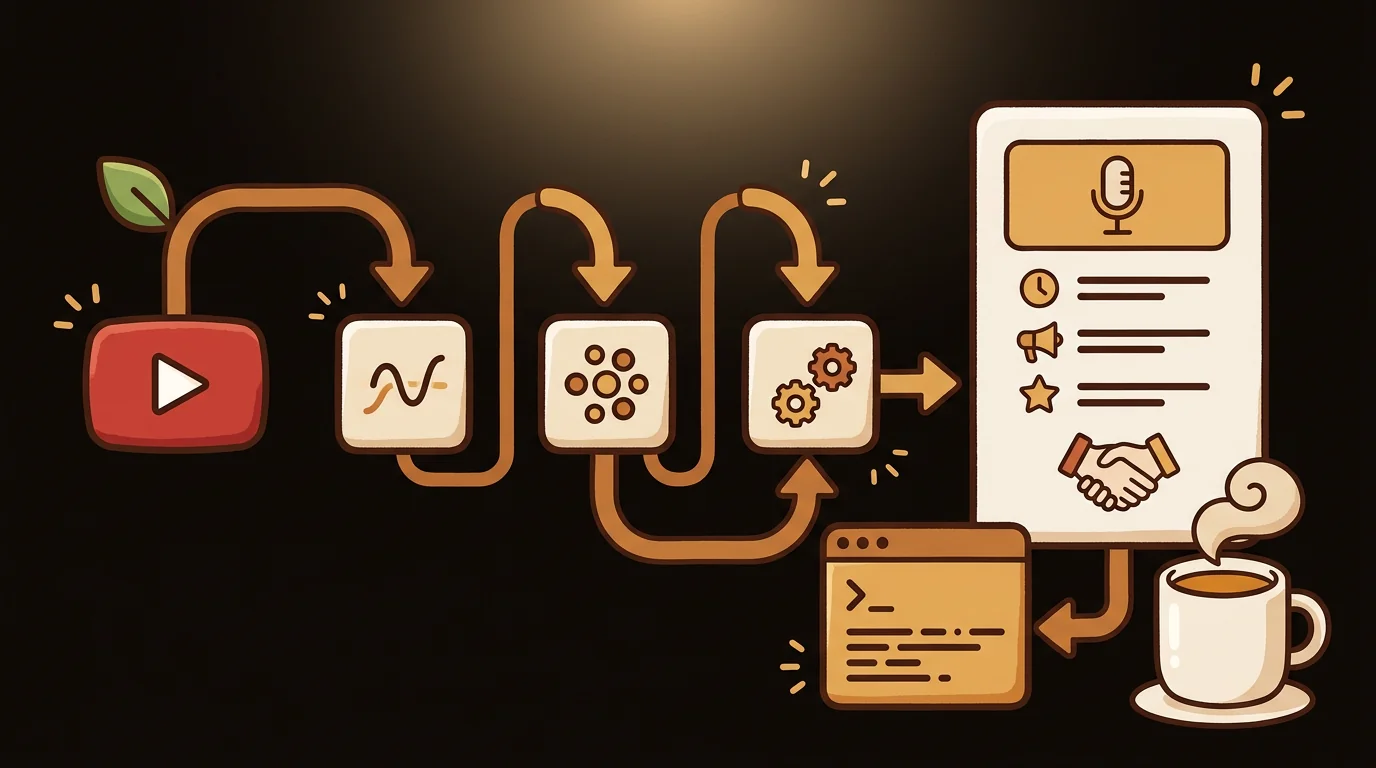
An AI daily brief from YouTube works by monitoring a channel's RSS feed for new uploads, transcribing the audio, and running it through a language model to extract key points and summaries. The result arrives as a morning email — no watching, no listening, no algorithm-driven feed.
Why Your YouTube Subscription Feed Doesn't Work as a Brief
YouTube's subscription feed is designed to maximize time-on-platform, not to help you process information efficiently. It surfaces what's most likely to get a click, not what's most relevant to your work. Video length gets rewarded regardless of information density. A 2-hour long-form interview and a 4-minute short get equal weight in the feed.
An AI brief inverts this. It doesn't care how long the video is — it extracts what matters. A 90-minute podcast episode becomes four bullet points. A 10-minute video update becomes a paragraph. You decide which deserve your full attention; the brief gives you the information to make that call.
We built sipsip.ai's Daily Brief feature after noticing that a large share of our users were manually running YouTube URLs through the transcription tool every morning to keep up with specific channels. The brief automates that workflow entirely.
What You Can Set Up a Daily Brief For
sipsip.ai's Daily Brief monitors any source with a public RSS feed or YouTube channel URL:
- YouTube channels — any creator, any topic. Tech channels like MKBHD or Linus Tech Tips, AI research channels, financial commentary, news channels, university lecture series.
- Podcast feeds — paste any RSS feed or search by podcast name. Apple Podcasts, Spotify, and most major podcasting platforms publish standard RSS feeds that sipsip can monitor.
- Individual playlists — useful for creators who separate their content by topic (interviews vs. tutorials vs. news).
The brief captures any content published within the past 24 hours. If a channel publishes nothing that day, you receive no email — it's not a placeholder digest. If a channel publishes three videos in a day (common for news-focused channels), you get summaries for all three.
Step-by-Step: How to Set Up Your AI Daily Brief
Step 1: Add your sources
Go to sipsip.ai/products/daily-brief and sign in. Click "Add Channel" or "Add Podcast." You can paste:
- A YouTube channel URL (e.g.,
youtube.com/c/channelnameoryoutube.com/@handle) - A podcast RSS feed URL
- A podcast name to search our index
You can add multiple sources — most users run 5–15 channels in a single brief.
Step 2: Set delivery time and format
Choose the time you want your brief to arrive. Most users set 6–8 AM in their local timezone so it's waiting when they start the day. You can choose email delivery, and signed-in users can also read past briefs in the sipsip dashboard.
For each source, you can toggle:
- Key bullet points (always included)
- One-paragraph summary
- Notable quotes (direct transcript excerpts)
- Whether to include only new content since your last brief
Step 3: Receive and use
The brief arrives as a structured email. Each channel or podcast gets its own section. New content published in the past 24 hours appears as:
- Title and channel name
- One-paragraph overview (what the video/episode is about)
- 3–5 key points (extracted claims, data, announcements)
- Notable quote (verbatim from the transcript)
- Link to source (original YouTube video or podcast episode)
You can click through to the full content for anything that earns a deeper read. For the rest, the brief is the read.
According to a 2025 Nielsen Media Research report, the average knowledge worker spends 47 minutes per day on passive content consumption — YouTube, podcasts, newsletters — without extracting actionable information. AI brief tools that structure this consumption into actionable summaries reduce that time to under 12 minutes for the same volume of sources.
What Makes a Good AI Daily Brief Source
Not every YouTube channel or podcast is a good brief source. A few guidelines from running thousands of daily briefs at sipsip.ai:
High-value brief sources:
- Channels with factual, information-dense content (news, analysis, tutorials, research walkthroughs)
- Podcasts with clear narrative structure (interview → key questions → recommendations)
- Creators who publish consistently on a schedule (daily or 2–3x per week)
Lower-value brief sources:
- Reaction or commentary channels where the value is the host's personality, not the information
- Long-form lifestyle content where summarization loses most of the value
- Channels where the visual content is the point (cooking demos, physical demonstrations)
The brief works best when the content would survive transcription — when the words themselves carry the value, not the delivery.
Comparing Brief Delivery Methods
| Method | Setup time | Manual effort | Completeness |
|---|---|---|---|
| YouTube feed (manual) | 0 min | Daily scrolling | ~30% of uploads |
| Email newsletter (creator-run) | 2 min | Subscribe | Creator's curation only |
| sipsip.ai Daily Brief | 3 min | None | 100% of new uploads |
| Paid monitoring service | 10+ min | Some | 100%, higher cost |
The creator-run email newsletter is the closest competitor to an AI brief — but it depends on the creator to run one, and most don't. sipsip fills that gap for any channel, whether or not the creator sends emails.
Frequently Asked Questions
How do I get a daily brief from a YouTube channel? Use sipsip.ai's Daily Brief: go to Daily Brief, paste any YouTube channel URL, set a delivery time, and save. Every morning, sipsip sends an AI-generated summary of every new video published in the past 24 hours.
Can I get an AI summary of a YouTube channel automatically? Yes. sipsip.ai's Daily Brief monitors any YouTube channel and delivers structured AI summaries on a daily schedule — key points, notable quotes, and a one-paragraph overview for each new upload.
Is there a free AI daily brief tool? sipsip.ai offers 30 free credits with no credit card required, enough to try the Daily Brief feature across multiple channels before committing to a plan.
What is a daily intelligence briefing? A daily intelligence briefing is a curated summary of new information from selected sources, delivered on a schedule. In tools like sipsip.ai, this means automated AI summaries of YouTube channels and podcasts — structured key points, not a raw content dump — delivered to your inbox each morning.
Getting Started
The fastest way to test the Daily Brief is to add one source — a YouTube channel or podcast you already follow — and let it run for three days. By day three, you'll know which parts of the brief you're reading and which you're skipping, and you can tune the format accordingly.
For anyone who follows more than three high-output channels, the brief typically saves 30–60 minutes per week compared to manual consumption — without missing any content.
Start your free brief — 30 credits included, no card needed.
Keep Reading
- The AI Daily Brief: Transcripts & Episode Summaries — How to get full transcripts of Nathaniel Labenz's AI news podcast.
- 7 Best AI Podcast Summarizer Tools in 2026 — Compared 50+ episodes across tools to find which summarizers save the most time.
- YouTube Transcript Generator — Free — Get a full transcript from any YouTube video in seconds.
Frequently asked questions

With a background spanning advertising and internet, I've launched 8+ apps and built 10+ products across mobile, web, and AI. Now I'm building a system that extracts signal from noise — turning fragmented information into clear, actionable decisions.